Know exactly where your Support at Home budget stands.

A live forecast of where your budget will land, provider statements reconciled in minutes and recurring expenses that log themselves. We never manage, hold or access your funds.

MyCareFunds is a budgeting and tracking tool. We are not a Support at Home provider or service manager and we do not manage, hold or access your funds.
MT
Margaret’s carePersonal care budget
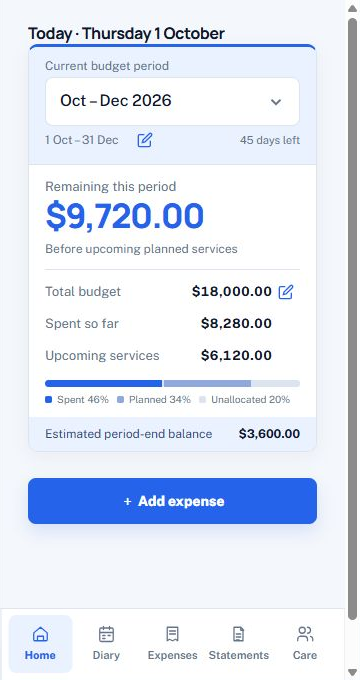
Current MyCareFunds Home screen with sample budget data

Sample records · AUD

Three jobs, done properly.

We built the whole app around the three things every self-managed package needs - so the everyday admin quietly runs itself.

See where you'll land - before you get there.

Every expense you log updates a live projection of your balance at period end. No more guessing whether this week's spending is fine or going to sting.

  • Projected end-of-period balance, recalculated with every expense
  • Safe-to-spend and at-risk funds split out on one progress bar
  • An Exclude Public Holidays toggle keeps service forecasts honest

Services & Projections

April 2026 · 18 days left

Today
Spent so far Projection Today

Projected left at 30 Apr

0.00

Reconcile your provider's statement in minutes, not evenings.

Upload a provider statement and scan its charges. Compare suggested matches with your recorded expenses and review quantities, rates and totals before confirming.

  • Scan statement PDFs and review the extracted charges
  • Lines auto-match against your tracked expenses
  • Helps flag genuine differences for review

April_statement.pdf

Your provider's monthly statement

🩺

Nursing visit

4 Apr · $180.00

🧺

Household cleaning

7 Apr · $95.00

🚗

Transport - medical

9 Apr · $42.50

📋

Care management fee

30 Apr · $312.00

22 of 23 lines matched automatically - 1 flagged for your review.

Your regulars log themselves - even when life gets busy.

Set the Tuesday cleaner and the Thursday nurse once. From then on they quietly add themselves - skipping public holidays and catching up on any days you missed.

  • Weekly, fortnightly, monthly or fully custom schedules
  • Public-holiday skips and automatic catch-up after a break from the app
  • Sync expenses to your phone's calendar and reminders

Recurring schedule

April 2026

MTWTFSS
1 2 3 4 5 6 7 8 9 10 11 12 13 14 15 16 17 18 19 20 21 22 23 24 25 26 27 28 29 30
Cleaner · Mondays Nurse · Thursdays Public holiday skipped
🧺

Cleaner - Household

Mon 13 Apr · $95.00

🩺

Nurse visit - Nursing Care

Thu 16 Apr · $180.00

And everything around them.

The supporting cast - no hidden tiers, no paywalls on the essentials.

Care team & helpers

Helpers, carers and providers - contacts, availability, rates and contract PDFs in one address book built for care.

Smart reminders

Nudges before reviews, top-ups and recurring visits - synced to every device in the household.

Household sharing

Invite family as editors or read-only viewers. Three siblings, three time zones, one budget in sync.

One-tap PDF reports

Report-ready budget summaries when your case manager asks - quick to export and easier than rebuilding a spreadsheet.

Private & secure

Encryption at rest and in transit, two-factor authentication and access controls for each household.

Works offline

Previously verified accounts can use cached records offline within a seven-day freshness window. Reconnect to sync changes; expired access requires online verification.

Set up in minutes. Feel in control from day one.

  1. 1

    Sign in to your care account

    Sign in with Google or email. Access is currently available to approved accounts, with two-factor authentication protecting your care records.

  2. 2

    Set your budget

    Enter your package total and period dates. We handle the projections, days-left and rollover maths.

  3. 3

    Track as you go

    Add an expense, attach a receipt or set up recurring services. Review your budget and statement matches as you go.

Quick answers.

Do you manage or hold my Support at Home funds?
No. MyCareFunds is a budgeting and tracking tool only. We are not a Support at Home provider or service manager. We do not manage, hold, transfer, withdraw or access your funds - those stay with your approved provider. Our app simply helps you record expenses and understand your budget.
Is my financial data safe?
We use encryption at rest and in transit, two-factor authentication and per-household access rules. Approved household members can access records according to their assigned role.
Do I need to sign in?
Yes. The current release requires an approved account. Sign in with Google or email and complete two-factor authentication to access your household. Contact help@mycarefunds.com.au to request access.
How does statement reconciliation work?
Upload your provider's monthly PDF and the built-in OCR pulls out the line items, then matches them against your tracked expenses. Anything that doesn't line up is highlighted so you can review it.
Can my family see my budget?
If you invite them. Household sharing lets you add family members as editors (full access) or viewers (read-only). They sign in with their own Google account - no passwords shared.
Is there a cost?
MyCareFunds is free to download and use for the essentials. If we introduce paid plans in the future, core tracking will remain free.

Take control of your care budget today.

No card, no trial clock. Set up your first budget period in under five minutes - and share it with family for free.

Google Play
Coming Soon
App Store
Coming Soon
Open Web Portal
No ads No trackers No lock-in Works offline